
Automated Website Deployment Pipeline
Overview: An automated solution for deploying websites from Github repositories.
The Problem
Designing and building software solutions to a problem is only part of the battle, the deployment process can be time-consuming and prone to error when done manually. Combined with having to interface multiple systems, in this case Github and the Amazon EC2 instance that runs the web server, the process of deploying to production can become cumbersome.
My Solution
I used Github Actions to create a continuous integration and deployment (CI/CD) pipeline through creating Amazon EC2 instances and configuring them as ephemeral Github Actions Runners.
Tech Stack
- Github / Version Control System
- Github Actions / Workflow Automation
- Docker / Containerization
Before:
Code had to be manually deployed to the production server. First, new code would be pushed to a staging environment, then manually pulled to the remote production server, and finally, the web server would have to be restarted to reflect the changes, all done via SSH. These steps can easily be automated.
Setup
I automated this process by creating a Github Actions workflow that automatically deploys changes to the production server when a push event occurs. When the workflow is triggered, it performs the following steps in the diagram below:
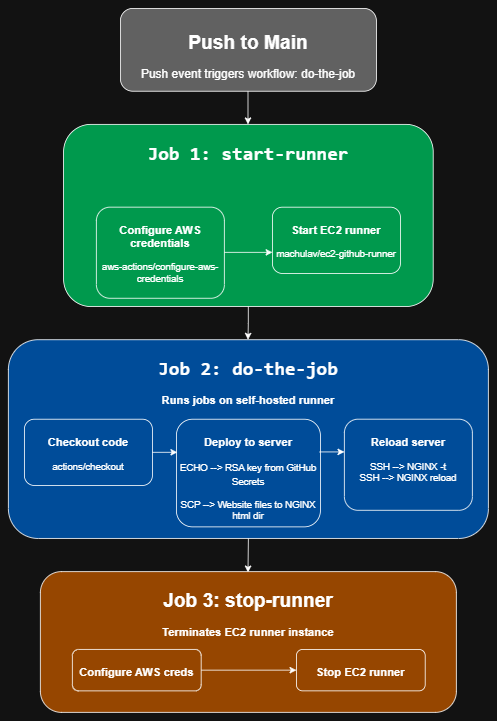
Here is the actual .yml file:
name: do-the-job
on:
  push:
    branches:
      - main
jobs:
  start-runner:
    name: Start self-hosted EC2 runner
    runs-on: ubuntu-latest
    outputs:
      label: ${{ steps.start-ec2-runner.outputs.label }}
      ec2-instance-id: ${{ steps.start-ec2-runner.outputs.ec2-instance-id }}
    steps:
      - name: Configure AWS credentials
        uses: aws-actions/configure-aws-credentials@v4
        with:
          aws-access-key-id: ${{ secrets.AWS_RUNNER_PUBLIC_ID }}
          aws-secret-access-key: ${{ secrets.AWS_RUNNER_SECRET }}
          aws-region: ${{ secrets.AWS_REGION }}
      - name: Start EC2 runner
        id: start-ec2-runner
        uses: machulav/ec2-github-runner@v2
        with:
          mode: start
          github-token: ${{ secrets.GH_PAT }}
          ec2-image-id: ${{ secrets.EC2_IMAGE_ID }}
          ec2-instance-type: t3.micro
          subnet-id: ${{ secrets.EC2_SUBNET_ID }}
          security-group-id: ${{ secrets.SECURITY_GROUP_ID }}

  do-the-job:
    name: Do the job on the runner
    needs: start-runner # required to start the main job when the runner is ready
    runs-on: ${{ needs.start-runner.outputs.label }} # run the job on the newly created runner
    steps:
      - name: Checkout code
        uses: actions/checkout@v6
      - name: Deploy to server
        env:
          key: ${{ secrets.EC2_KEY }}
          host: ${{ secrets.EC2_HOST }}
          username: ${{ secrets.EC2_USER }}
        run: |
          git pull origin main
          echo "$key" > EC2-portfolio-key.pem
          chmod 400 EC2-portfolio-key.pem
          scp -i EC2-portfolio-key.pem -o StrictHostKeyChecking=no -r website-template/* ${{ secrets.EC2_USER }}@${{ secrets.EC2_HOST }}:/usr/share/nginx/html/
          ssh -T -i EC2-portfolio-key.pem -o StrictHostKeyChecking=no ${{ secrets.EC2_USER }}@${{ secrets.EC2_HOST }} << 'EOF'
            sudo nginx -T
            sudo systemctl reload nginx
          EOF

  stop-runner:
    name: Stop self-hosted EC2 runner
    needs:
      - start-runner # required to get output from the start-runner job
      - do-the-job # required to wait when the main job is done
    runs-on: ubuntu-latest
    if: ${{ always() }} # required to stop the runner even if the error happened in the previous jobs
    steps:
      - name: Configure AWS credentials
        uses: aws-actions/configure-aws-credentials@v4
        with:
          aws-access-key-id: ${{ secrets.AWS_RUNNER_PUBLIC_ID }}
          aws-secret-access-key: ${{ secrets.AWS_RUNNER_SECRET }}
          aws-region: ${{ secrets.AWS_REGION }}
      - name: Stop EC2 runner
        uses: machulav/ec2-github-runner@v2
        with:
          mode: stop
          github-token: ${{ secrets.GH_PAT }}
          label: ${{ needs.start-runner.outputs.label }}
          ec2-instance-id: ${{ needs.start-runner.outputs.ec2-instance-id }}
This workflow performs the following jobs: start-runner, do-the-job, and stop-runner. Start-runner configures aws credentials for GitHub Actions authentication. It uses OpenID Connect (OIDC) to authenticate to AWS with temporary credentials and assume a custom IAM role with the proper permissions to spin up an EC2 instance. After that it'll output variables "label" and "ec2-instance-id" for use in later jobs.
Do-the-job waits for start-runner to finish so it can perform its tasks on the newly created runner. It'll checkout the code from the GitHub repository and connect to another EC2 instance (web server host instance) via SSH using proper credentials stored using GitHub Secrets. It then performs a series of commands through the SSH client on the target machine to merge the code and reload NGINX to show the newest changes.
Stop-runner terminates the EC2 instance after do-the-job has finished its tasks. It re-authenicates to AWS and assumes the proper IAM role to terminate the EC2 instance. If do-the-job fails to complete its tasks (e.g. fails SSH authentication), stop-runner will still terminate the EC2 instance.
Now, when I push new code, it automatically deploys to the production server with an ephemeral EC2 instanced runner.
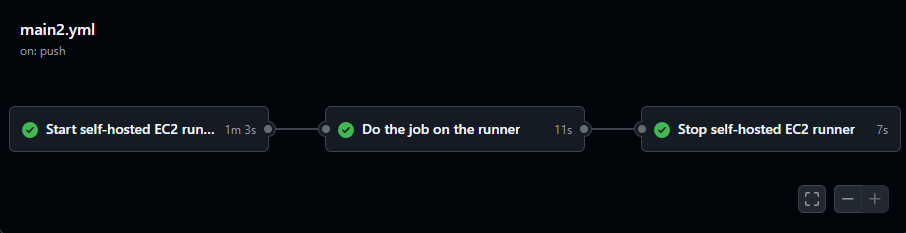
Even if the job fails, the pipeline will still shutdown the EC2 instance to avoid incurring unnecessary costs.
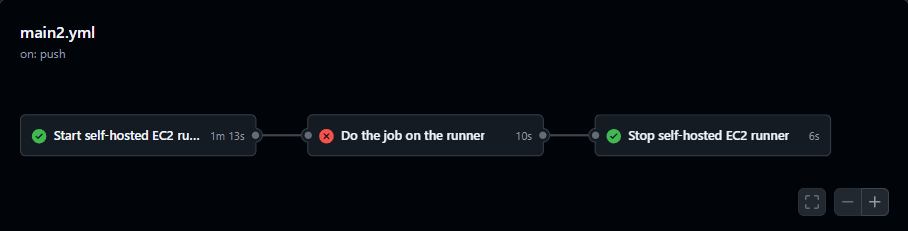
For now, we're done! I've implemented this pipeline for the GitHub repository that hosts the code for this website. Next, we'll add linting to automate error checking in our pipeline and add some branch control to the repository.
Linting & Branch Management
All the code that is committed should be pushed to a non-production branch so that it can be reviewed before it is merged with the main branch, since a merge event with main will trigger the "main2.yml" workflow and automatically deploy our new code. I've modeled the branch management strategy for this project after a Github Flow model, which emphasizes short-lived branches, rapid iteration, pull-request reviewing, and is compatible with CI/CD pipelines.
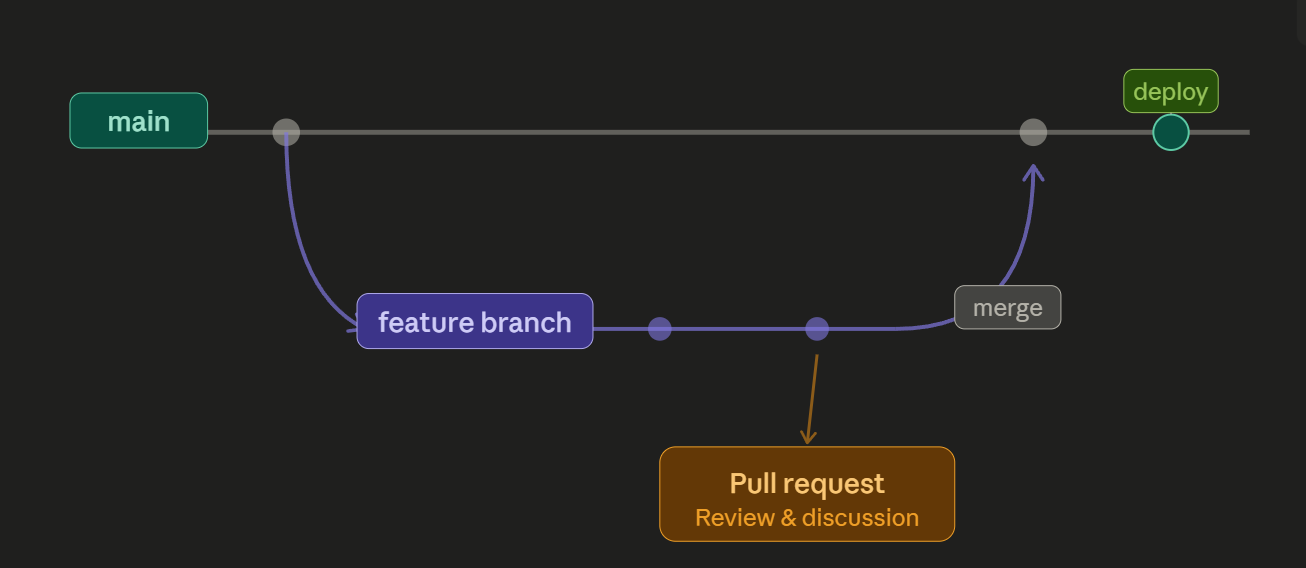
So, every time I start working on a new feature or add new content, I'll create and work in a new branch, but how would I automate parts of the review process before it gets merged to main? I started by creating another workflow that will check for errors so it doesn't automatically deploy code with errors that need to be fixed. I used htmlhint to check for potential errors in my html files and Lychee to verify that all the URLs on the website are functional.
Start by navigating to the root directory of the project and creating a "package.json" file. Then I install htmlhint and stylelint. For now, I'll only use htmlhint since the CSS written is from a free website template that I'm using for this website, but we'll come back and enable stylelint if I find myself writing additional CSS. I completed these steps using with npm in a Bash CLI using these commands:
        npm init -y # Creates package.json
        npm install --save-dev htmlhint # installs htmlhint
        npm install --save-dev stylelint stylelint-config-standard # installs stylelint
Now we'll need to edit the "scripts" section in our new package.json file:
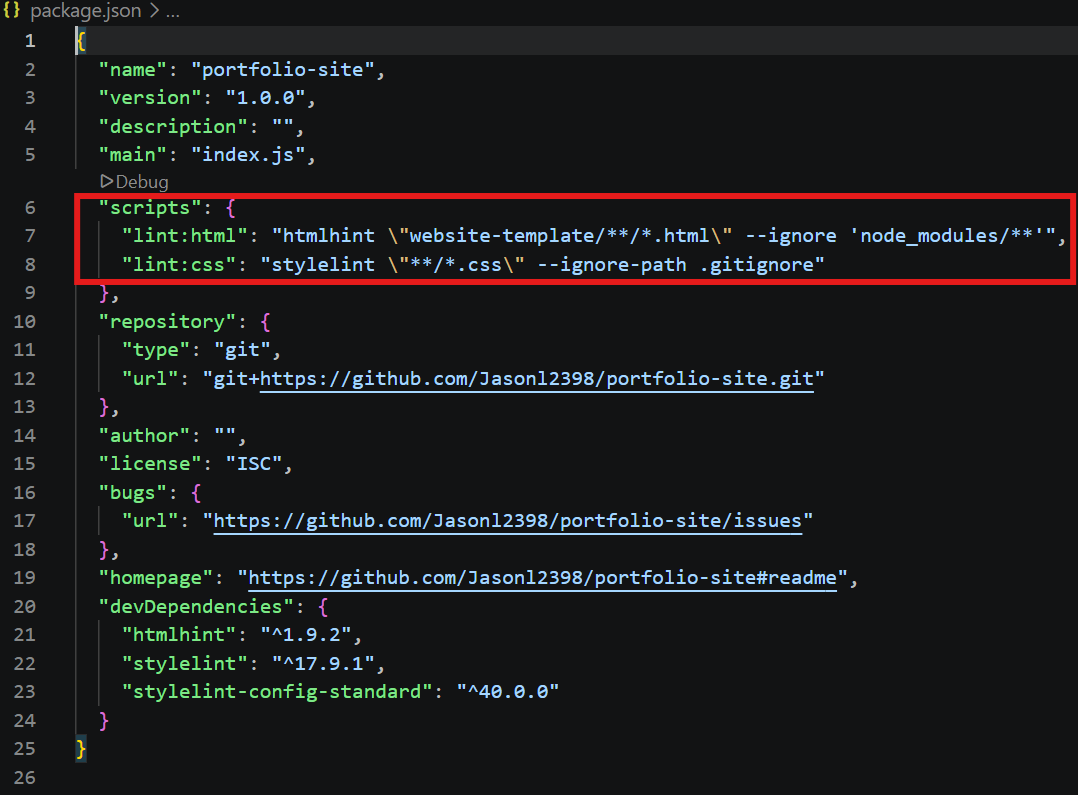
I verified that the scripts work locally by introducing intentional errors in my code and running the linters in my CLI:
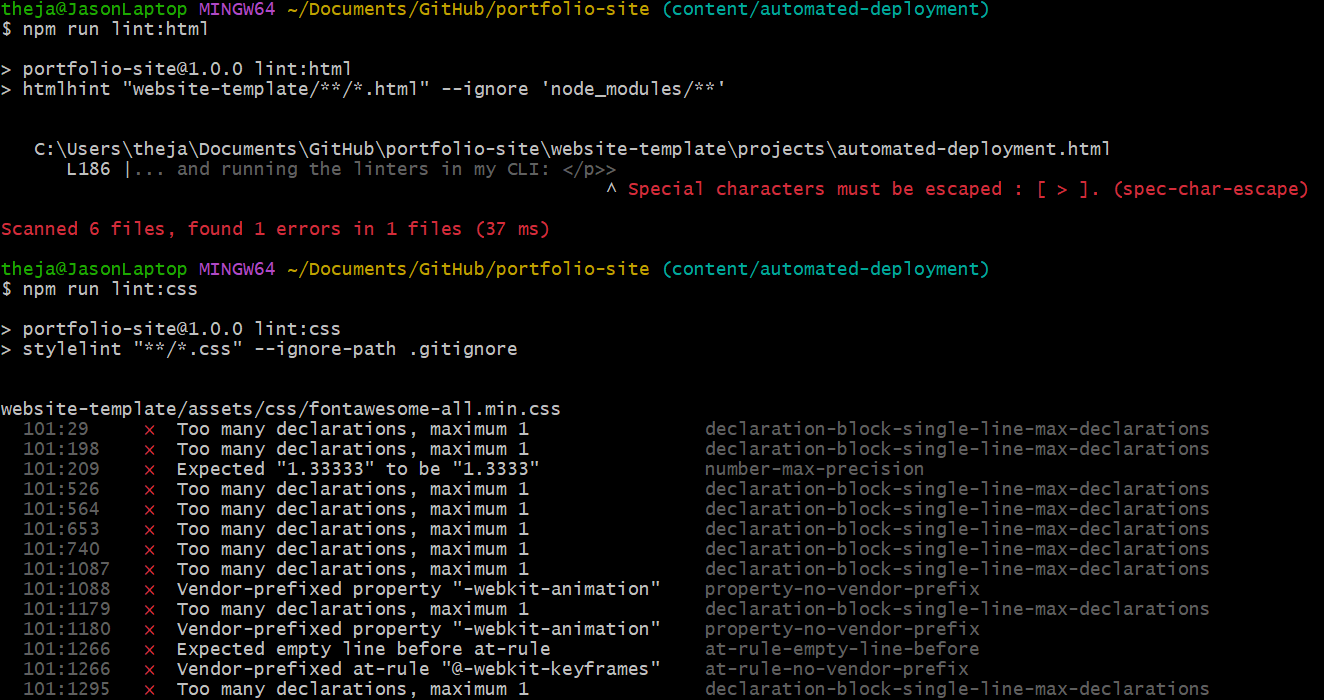
From the above output, we can see that htmlhint has caught the error I introduced and flagged it. Stylelint has flagged a ton of errors in the CSS files from the template which is why we are choosing not to use it yet as I believe this is from a few formatting issues in the CSS files. When I decide that I need to write additional CSS code I'll re-enable stylelint and configure it to ignore the files not written by me.
Now if I remove the error, htmlhint should run with no errors:

I needed to create a new .yml file for GitHub Actions. This .yml file will trigger on a pull request event and run the linting script. It will also check links with the Lycheeverse link checker that I mentioned earlier.
Here is the ci.yml file:
name: CI

on: [pull_request]

jobs:
  validate:
    name: validate-PR
    runs-on: ubuntu-latest
    steps:
      - uses: actions/checkout@v4

      - uses: actions/setup-node@v4
        with:
          node-version: 20

      - run: npm ci

      - name: Lint HTML
        run: npm run lint:html

      - name: Check links
        uses: lycheeverse/lychee-action@v2
        with:
          args: --no-progress --verbose --root-dir ${{ github.workspace }} --accept 999,200 './**/*.html'
This workflow will trigger the following actions: It will checkout the code I've committed to a non-production branch and set up a Node.js environment environment for us on an Ubuntu instance, then run our HTML linter and Lychee link checker. If our code passes these checks, then we can merge the new code from the non-production branch to the main (production) branch.
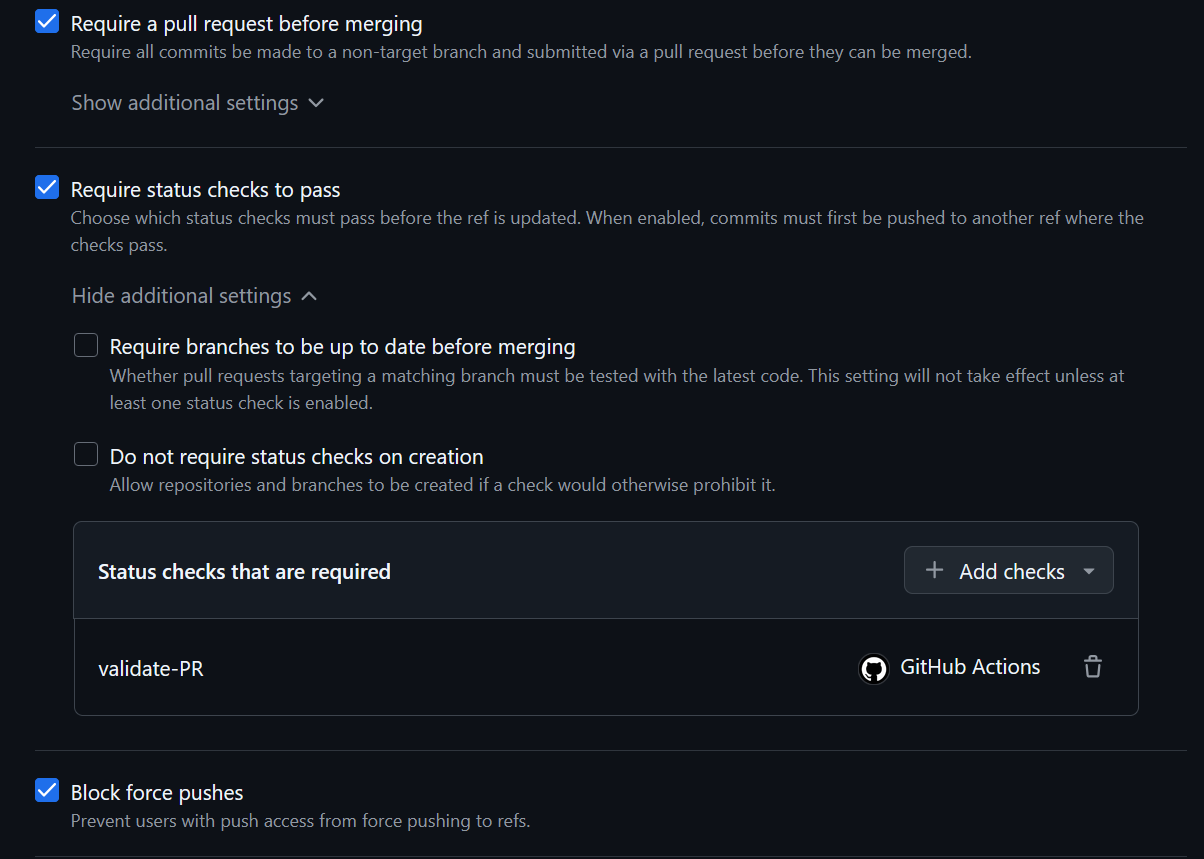
I also added a new branch ruleset to protect our main branch. This ruleset will enforce pull request reviews and requiring status checks from our ci.yml workflow to pass prior to merging the feature branch into the main branch. We'll also prevent having changes force pushed into the main branch.
I'll test this by creating a new branch named "content/automated-deployment" a commit then push some new changes I've made to the website. Once this is done, GitHub will show that new changes have been made to a branch and that we can open a pull request.
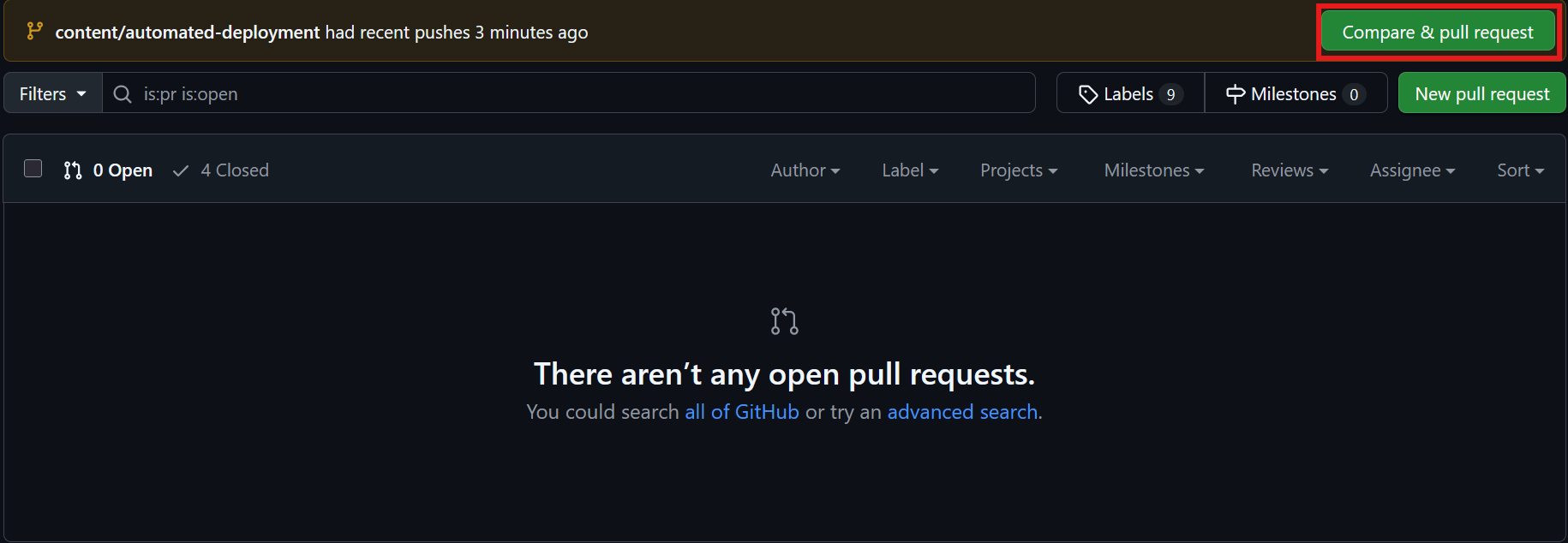
Once the pull request is open, it will run our ci.yml file and have a green checkmark symbol if our code has passed the checks.
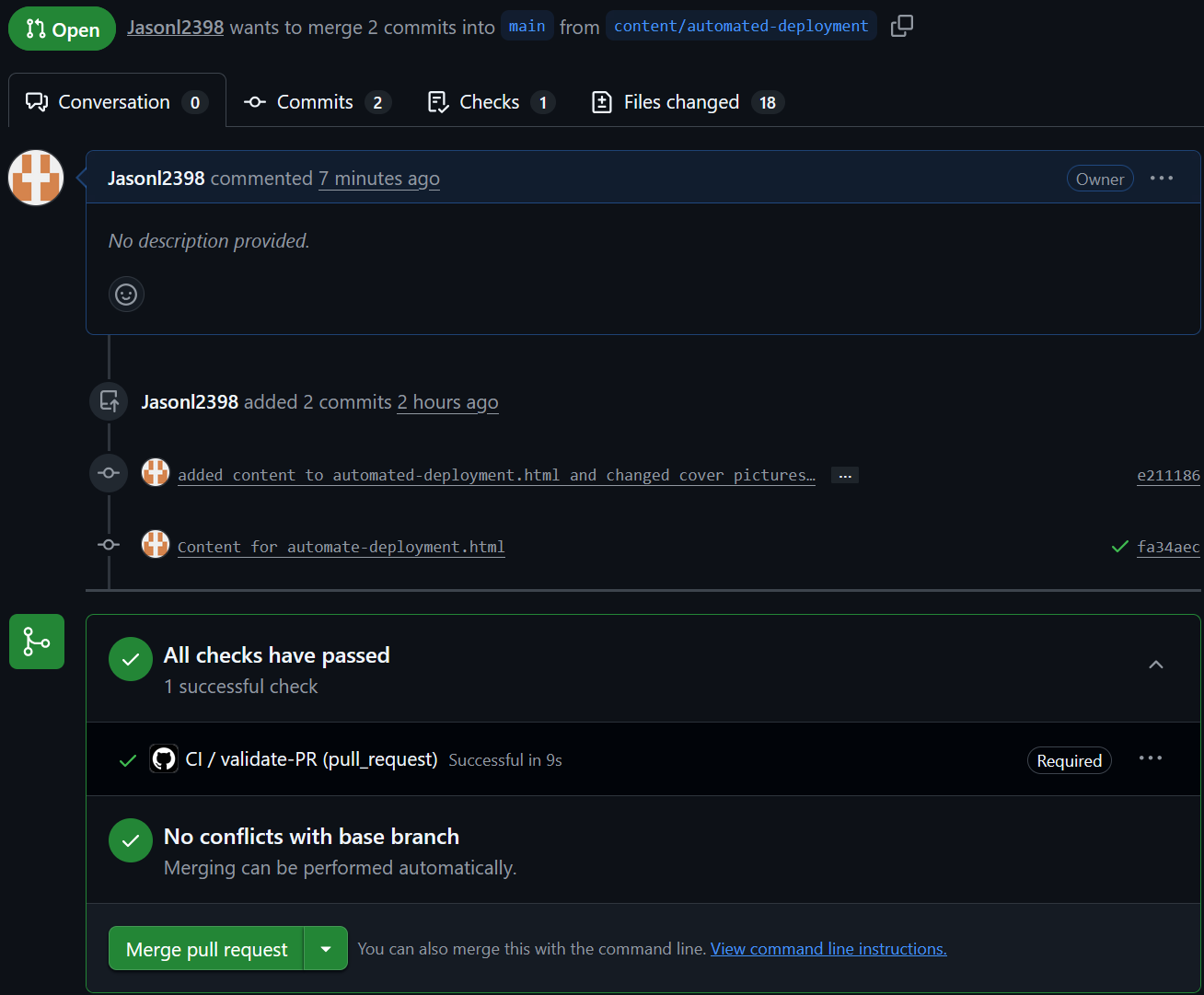
Now we can merge our code into main and deploy it into production! The merge will activate or main2.yml file and deploy our new code to the NGINX web server that is hosted on our EC2 instance.
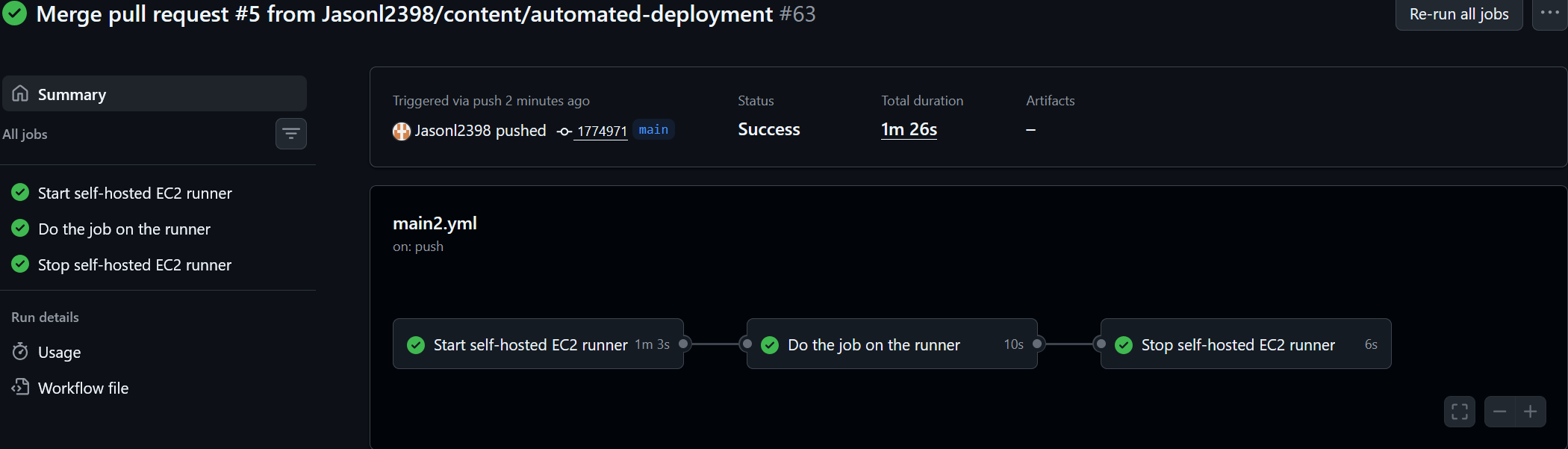
We're finished! All that's left is to delete our "content/automated-deployment" branch. Whenever there is something else I want to add, I'll create and work in a new branch.